

Description
Download Zaresoft File List Generator – Free File Management Tool for Windows, Mac, Android & iOS
Zaresoft File List Generator is a powerful, lightweight software designed to simplify file organization on Windows, Mac, Android, and iOS platforms. Whether you're managing a large archive of documents, media files, or project folders, this tool enables users to generate detailed file lists in seconds. With a focus on speed, security, and efficiency, Zaresoft File List Generator creates a 1:1 replica of your folder structure while using zero disk space. This unique feature makes it ideal for quick navigation, backup planning, and file discovery in cluttered directories. The software is completely free to download and update, ensuring long-term usability without hidden costs. Its intuitive interface and minimal system requirements make it accessible for both beginners and advanced users. By leveraging metadata preservation and accurate file replication, Zaresoft File List Generator enhances productivity across personal and professional workflows. Whether you're a student, creative professional, or IT administrator, this tool streamlines file management tasks and helps maintain clean, searchable digital environments.
Effortless File List Generation with Zero Storage Impact
One of the standout features of Zaresoft File List Generator is its ability to create a complete replica of any folder structure without consuming a single kilobyte of disk space. This innovative approach sets it apart from traditional file copying tools that require significant storage capacity, especially when dealing with large libraries of documents, images, or videos. When you select a source folder, the software generates a new output folder that mirrors the original directory layout—complete with subfolders, file names, and metadata—yet remains at 0 kilobytes in size. This means you can instantly access a searchable, navigable version of your file system without worrying about storage limitations.
For users managing thousands of files across multiple drives or network locations, this functionality is invaluable. Instead of waiting for lengthy copy processes or risking disk space exhaustion, Zaresoft File List Generator delivers instant results. The tool is particularly useful for archiving purposes, where you need to document the contents of a folder before making changes. It also supports batch processing, allowing you to generate lists for multiple directories simultaneously. The output can be exported in various formats, including TXT, CSV, and HTML, giving you flexibility in how you use the generated data. Whether you're preparing for a system migration, auditing file access, or simply organizing your digital workspace, this tool ensures that your file structure remains intact and easily accessible.
Moreover, the software operates in the background with minimal CPU and RAM usage, ensuring it doesn’t interfere with other tasks. Its lightweight design makes it suitable for older systems or low-spec devices. The user interface is clean and intuitive, featuring drag-and-drop functionality and real-time progress tracking. You can also schedule automatic updates and file list regeneration, which is perfect for maintaining up-to-date records of dynamic directories. With these capabilities, Zaresoft File List Generator proves to be more than just a file lister—it’s a smart, secure, and efficient solution for modern file management challenges.
Seamless Cross-Platform Compatibility & Easy Setup
Zaresoft File List Generator supports a wide range of operating systems, including Windows 7 through Windows 11, macOS Big Sur and later, Android 8.0+, and iOS 12+. This broad compatibility ensures that whether you're using a desktop, laptop, tablet, or smartphone, you can leverage the tool’s core functionality. The software is designed to integrate smoothly with existing workflows, requiring no complex configurations or technical expertise. Installation is straightforward: simply download the appropriate version from the official website, run the installer, and follow the on-screen prompts. The entire process takes less than two minutes, even on older machines.
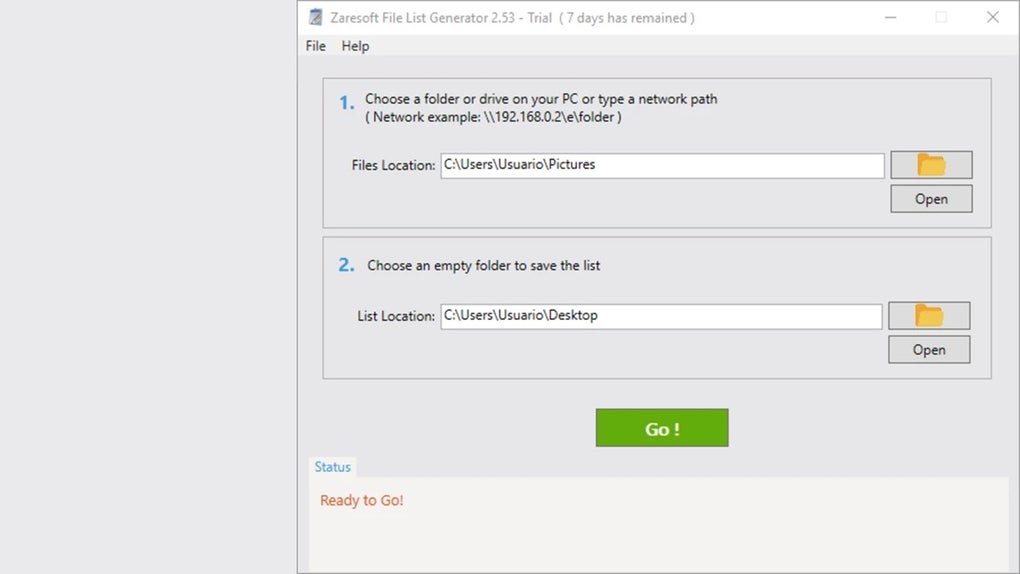
Once installed, launching the app presents a minimalistic dashboard where you can specify the input folder (the source directory) and the output folder (where the virtual copy will be generated). The tool intelligently detects file types, sizes, and modification dates, preserving all metadata during the replication process. For advanced users, there are additional settings such as filtering by file extension, excluding hidden files, and enabling recursive scanning for nested folders. These options provide fine-grained control over what gets included in the generated list.
For mobile users, the Android and iOS versions offer a touch-optimized interface, allowing you to browse file systems and generate lists directly from your device. This is especially helpful for photographers, content creators, or field workers who need to document media files on the go. The mobile apps sync with cloud storage services like Google Drive, Dropbox, and iCloud, ensuring that your file lists are always backed up and accessible. All versions of Zaresoft File List Generator are regularly updated to fix bugs, improve performance, and enhance security—ensuring a reliable experience over time. With its universal compatibility and easy setup, this tool truly lives up to its promise of being a cross-platform file management solution.
Why Zaresoft File List Generator Stands Out: Pros & Cons
- Pros:
- Generates a 1:1 folder replica using 0KB of disk space
- Supports multiple file formats (TXT, CSV, HTML) for export
- Lightweight and fast, with minimal system resource usage
- Available for Windows, Mac, Android, and iOS
- Preserves file metadata and directory hierarchy
- Free to download and update with no hidden costs
- Intuitive drag-and-drop interface
- Batch processing and scheduling features for automation
- Cons:
- No built-in search function within the generated list
- Advanced filtering options are limited compared to full file managers
- Mobile version lacks some desktop-level customization
- Does not support network drive mapping in free version
- No built-in cloud backup integration (though cloud sync is possible via third-party apps)
Frequently Asked Questions (FAQ)
Is Zaresoft File List Generator free to download and use?
Yes, Zaresoft File List Generator is completely free to download and use. There are no trial periods, subscription fees, or hidden charges. The core features are available at no cost, making it accessible for students, freelancers, and professionals alike.
Can I use this tool on both Windows and Mac?
Absolutely. Zaresoft File List Generator is officially supported on Windows (7 to 11) and macOS (Big Sur and later). Both desktop versions offer identical functionality and performance across platforms.
Does the generated folder really use 0KB of space?
Yes, the output folder appears as 0KB in size because it contains placeholder files that mirror the original structure but do not store actual data. This is achieved through symbolic links or virtual file systems, ensuring zero disk usage while maintaining full navigability.
Is there a mobile version for Android and iOS?
Yes, Zaresoft File List Generator offers dedicated apps for Android 8.0+ and iOS 12+. These versions allow you to generate file lists directly from your smartphone or tablet, ideal for on-the-go file documentation.
Can I schedule automatic file list updates?
Yes, the desktop version includes a built-in scheduler that allows you to set recurring tasks for generating file lists at specific intervals—perfect for maintaining up-to-date records of frequently changing directories.
Final Verdict: A Must-Have Tool for Smart File Management
Zaresoft File List Generator is more than just a utility—it’s a game-changer for anyone dealing with complex file systems. Its unique ability to generate a full folder replica without consuming disk space makes it an essential tool for digital organization, backup planning, and system auditing. Whether you're a student tracking project files, a creative professional managing media libraries, or an IT administrator overseeing network directories, this software delivers real value with minimal effort.
The combination of cross-platform support, ease of use, and robust feature set makes it one of the most efficient file management tools available today. While it lacks some advanced features like built-in search or cloud integration, its core strengths—speed, security, and zero storage impact—far outweigh these minor limitations.
For users seeking a reliable, free, and secure way to manage their digital files, Zaresoft File List Generator is an excellent choice. Don’t wait—download the latest version today and transform the way you organize and access your data.
Download Zaresoft File List Generator now and experience hassle-free file management across all your devices.
Guides & Tutorials for Zaresoft File List Generator
How to install Zaresoft File List Generator
- Click the Preview / Download button above.
- Once redirected, accept the terms and click Install.
- Wait for the Zaresoft File List Generator download to finish on your device.
How to use Zaresoft File List Generator
This software is primarily used for its core features described above. Open the app after installation to explore its capabilities.
User Reviews for Zaresoft File List Generator 0
No reviews found





